Project overview
Satellite of Glow is a warehouse and inventory management system for items, vendors, stock, checkout, warehouse transfers, and expiration batches. The platform relies on consistent relationships between Item Master records, warehouse placements, batches, and inventory transactions.
As a QA Engineer on the External Project team, I tested these connected workflows, reviewed requirements, documented bugs, and retested fixes with developers. My focus included correct stock quantities, availability across warehouses, and separation of Staging and Production data.
The five test cases and three bug reports below are selected examples from my broader QA work. They do not represent all modules tested, issues reported, or improvements suggested on Satellite of Glow.
Environment notes
Testing took place in Staging and Production, and occasionally in a local environment on a developer’s device. The three selected defects affected Production and were tested on Windows 11 25H2 using Microsoft Edge Version 155.0.4283.45 (Official build) (64-bit). BUG-03 was reproduced by creating a test item in Staging and checking whether it appeared in Production.
Role & contribution: QA Engineer, External Project team
- GitHub Kanban
- Postman
My contribution
- Reviewed requirements and inventory workflows with the project manager, clarified expected behavior, and suggested improvements when a ticket or workflow was unclear.
- Tested stock quantities, warehouse placements, batches, checkout, and related data consistency across connected modules.
- Documented reproducible bug reports in GitHub Kanban, explained the steps and expected behavior to developers, and retested fixes against requirements.
- Focused on business impact, including inventory corruption, checkout availability, and unintended data changes between environments.
Testing scope
- Product areas included Dashboard, Warehouse, Vendor, Checkout, Checkout Destination, Warehouse Transfer, Item Master, Expired Master, Activity Log, and event-related workflows.
- Warehouse stock operations, including adding and subtracting stock, batch and expiration handling, stock history, and quantity consistency.
- Item Master relationships, vendor stock, multi-warehouse placements, checkout eligibility, and warehouse transfers.
- Search and filter behavior, localization, workflow usability, edge cases, and environment data isolation.
Testing approach
- Applied exploratory, black-box, and functional testing to understand business rules and validate expected outcomes.
- Used end-to-end and integration checks for inventory state changes across stock updates, full checkout, restocking, and renewed checkout eligibility.
- Applied regression, smoke, sanity, negative, and boundary checks, including repeated actions beyond the normal single-click flow.
- Compared item and warehouse quantities, batches, and checkout availability across connected modules. Also performed usability and localization checks.
- Used Postman for limited API checks.
- Tested in Staging and Production, and occasionally in a local environment on a developer's device. Tracked findings and follow-up in GitHub Kanban.
Challenges & QA decisions
Treat repeated clicks as an inventory integrity risk
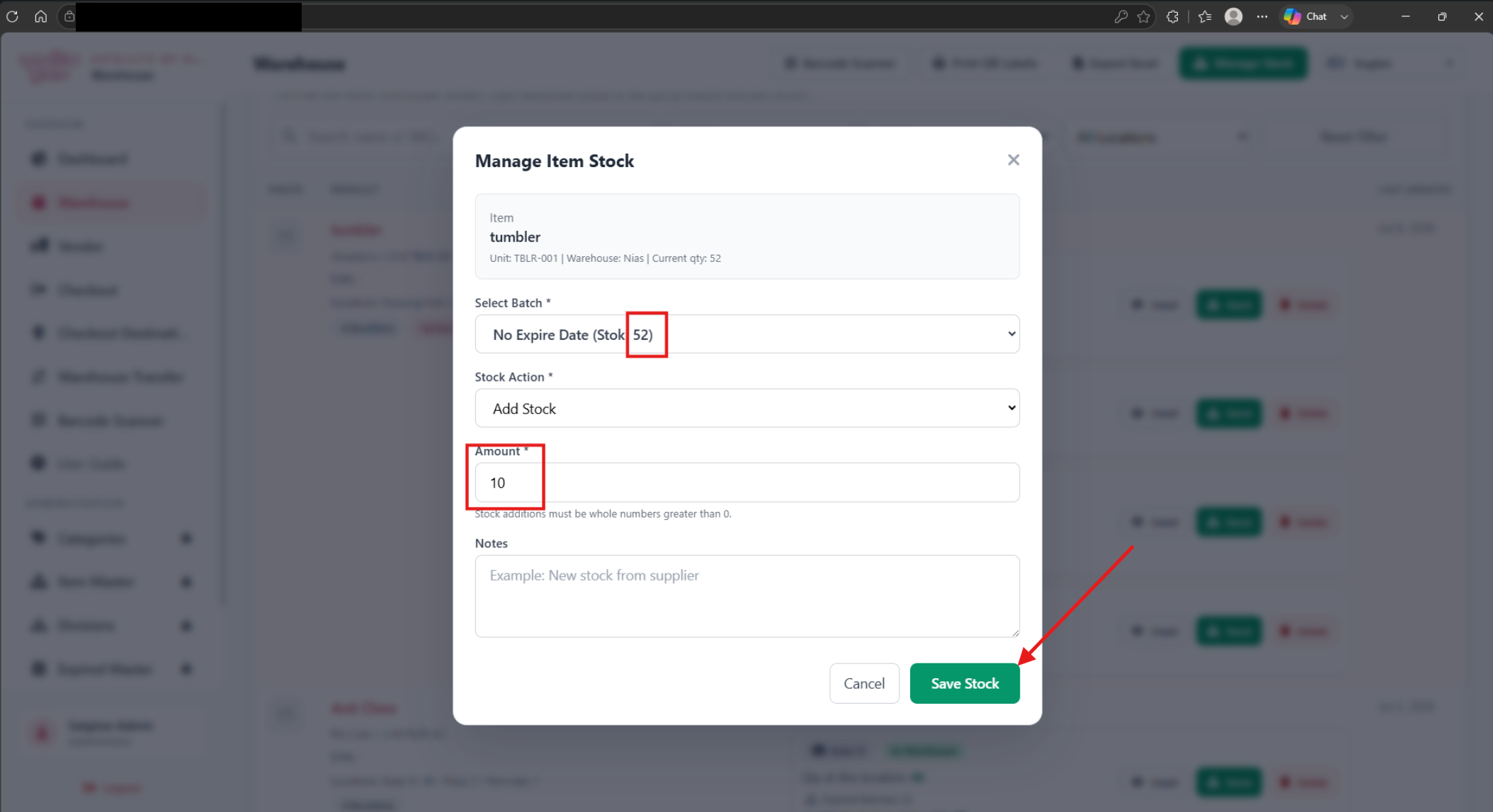
Repeated Save Stock clicks could process the same operation more than once and produce incorrect stock quantities. I tested rapid clicks while the first request was pending to check whether the stock update was processed only once.
Check the full checkout and restocking flow
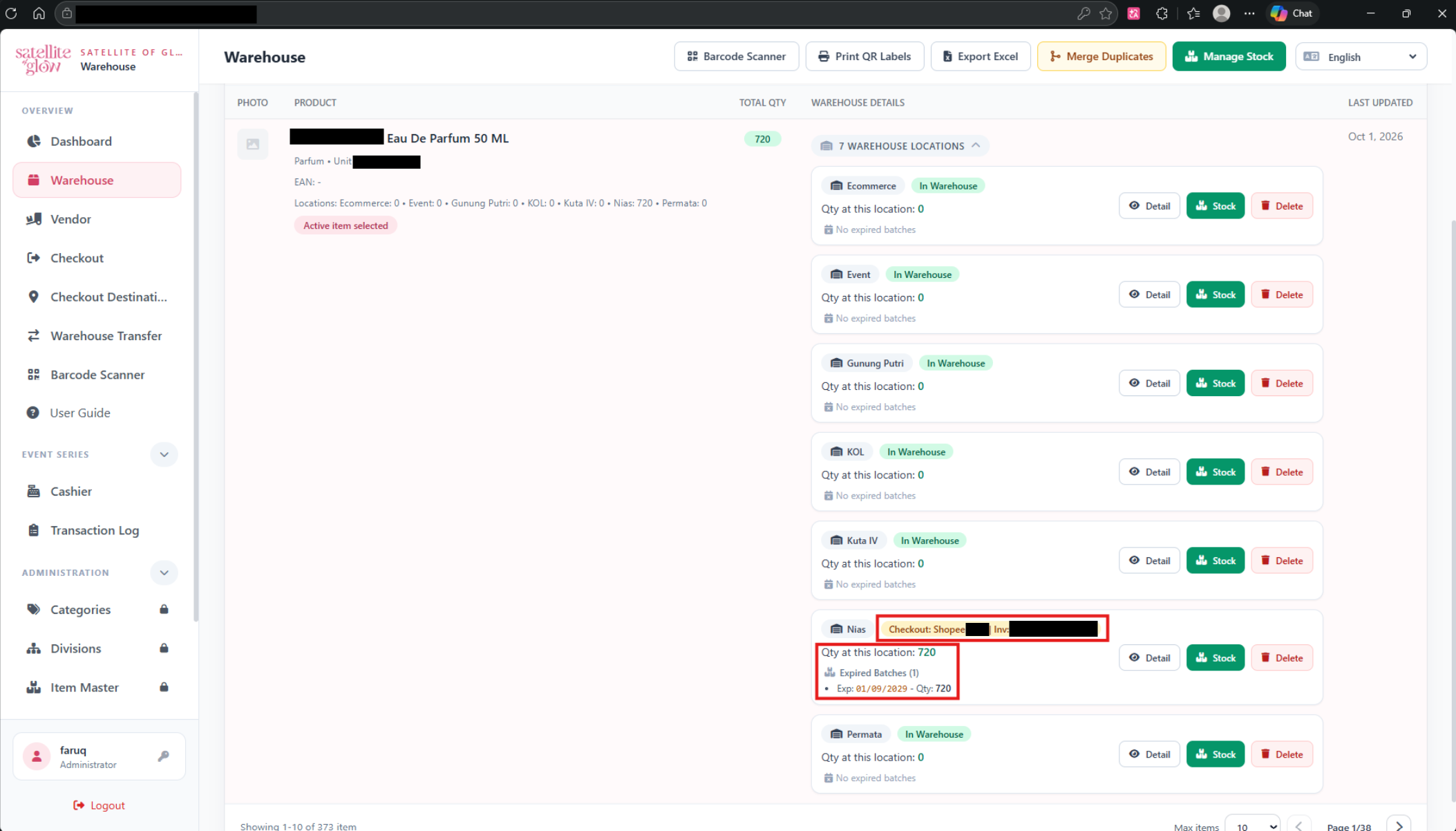
Warehouse showed newly added stock while Checkout still hid the same item's warehouse row. I checked the full flow from available stock to zero stock and back to restocked inventory, comparing the two pages at each stage.
Verify separation between Staging and Production
An item created in Staging also appeared in Production. I compared the Item Master data in both environments and reported the risk of test data affecting live operations.
Follow inventory relationships across modules
Satellite of Glow represents the same master item across warehouse placements, batches, transfers, and checkout. I considered how a change in one workflow could affect stock totals and availability in another.
Test cases
| ID | Scenario | Type | Result |
|---|---|---|---|
| TC-01 | Process one stock addition when Save Stock is clicked once | Functional / regression | Passed |
| TC-02 | Ignore rapid repeated Save Stock clicks while a request is pending | Negative / regression | Passed |
| TC-03 | Restore checkout availability after restocking a depleted warehouse | End-to-end / state transition | Passed |
| TC-04 | Keep other warehouse placements available during the restock lifecycle | Functional / regression | Passed |
| TC-05 | Keep items created in Staging out of Production | Integration / regression | Passed |
TC-01Process one stock addition when Save Stock is clicked once
- Type
- Functional / regression
- Preconditions
- A warehouse item has a current stock quantity of 52 in its selected batch.
- The Manage Stock modal or warehouse-specific Stock modal is open.
- Test data
- Add Stock by 10 units to the selected batch.
- Steps
- Select the batch with 52 units.
- Choose Add Stock and enter 10.
- Select Save Stock once.
- Wait for the request to complete and review the quantity and confirmation message.
- Expected result
- The stock quantity increases once to 62 and one success notification is displayed.
- Actual result
- On retest, the stock quantity increased once and one success notification appeared.
- Status
- Passed
- Related bug reports
- BUG-01
TC-02Ignore rapid repeated Save Stock clicks while a request is pending
- Type
- Negative / regression
- Preconditions
- A warehouse item has 52 units in the selected batch.
- The stock update request takes long enough for the user to click again before it completes.
- Test data
- Add Stock by 10 units; click Save Stock three times rapidly.
- Steps
- Open Manage Stock or the warehouse-specific Stock modal.
- Select a batch, choose Add Stock, and enter 10.
- Click Save Stock three times before the first request completes.
- Review the final stock quantity and success notifications.
- Expected result
- Only one update is processed: quantity becomes 62, duplicate clicks are blocked while processing, and only one success notification appears.
- Actual result
- On retest, only one stock update was processed and no duplicate success notifications appeared.
- Status
- Passed
- Related bug reports
- BUG-01
TC-03Restore checkout availability after restocking a depleted warehouse
- Type
- End-to-end / state transition
- Preconditions
- An item has 10 units available at the Nias warehouse.
- The item and warehouse can be checked in Warehouse and Checkout.
- Test data
- Check out all 10 units from Nias, then restock the same item and warehouse with 720 units.
- Steps
- Open Checkout and locate the item at Nias.
- Check out all 10 units and verify the Nias row is no longer checkout-eligible at zero stock.
- Add 720 units to that same item at Nias through the stock workflow.
- Return to Checkout and search for the item.
- Inspect the Nias row and available quantity.
- Expected result
- The Nias Item + Warehouse row reappears with the latest available quantity of 720 and can be selected for checkout.
- Actual result
- On retest, the Nias row reappeared with the updated quantity and was available for checkout.
- Status
- Passed
- Related bug reports
- BUG-02
TC-04Keep other warehouse placements available during the restock lifecycle
- Type
- Functional / regression
- Preconditions
- An item has stock at Nias and at least one other warehouse.
- The Nias stock can be fully checked out and then restocked.
- Test data
- Compare Nias with the item's other warehouse placements before and after restocking.
- Steps
- Review the item's available warehouse rows in Checkout.
- Complete the zero-stock and restock flow for Nias.
- Return to Checkout and review Nias and the other warehouse rows.
- Compare each displayed availability with the corresponding Warehouse quantity.
- Expected result
- The restocked Nias row returns with the latest quantity; other warehouse rows and quantities remain accurate and unaffected.
- Actual result
- On retest, the restored Nias row matched Warehouse stock and the other warehouse placements remained available as expected.
- Status
- Passed
- Related bug reports
- BUG-02
TC-05Keep items created in Staging out of Production
- Type
- Integration / regression
- Preconditions
- Staging and Production are accessible in Microsoft Edge.
- A unique synthetic test item can be created in Staging.
- Test data
- A uniquely named test item created in Staging; no real operational item is used.
- Steps
- Create the uniquely named item in Staging and save it.
- Search for the same item in Production and record whether it appears.
- Expected result
- The test item created in Staging does not appear in Production, and creating it does not change Production Item Master data.
- Actual result
- On retest, the test item created in Staging did not appear in Production.
- Status
- Passed
- Related bug reports
- BUG-03
Bug reports
BUG-01Rapid Save Stock clicks create duplicate inventory updates
- Environment / build
- Production — Warehouse / Stock Management.
- Browser
- Microsoft Edge Version 155.0.4283.45 (Official build) (64-bit).
- Device
- Windows 11 25H2.
- Preconditions
- A warehouse item has an available stock batch.
- The Manage Stock modal or warehouse-specific Stock modal is open.
- Steps
- Select a batch and choose Add Stock.
- Enter an amount of 10.
- Click Save Stock multiple times before the first request completes.
- Review the final quantity and success notifications.
- Expected result
- The first click starts one update and disables or locks the action until completion. The stock changes exactly once, one success notification appears, and the action is available again after the request completes.
- Actual result
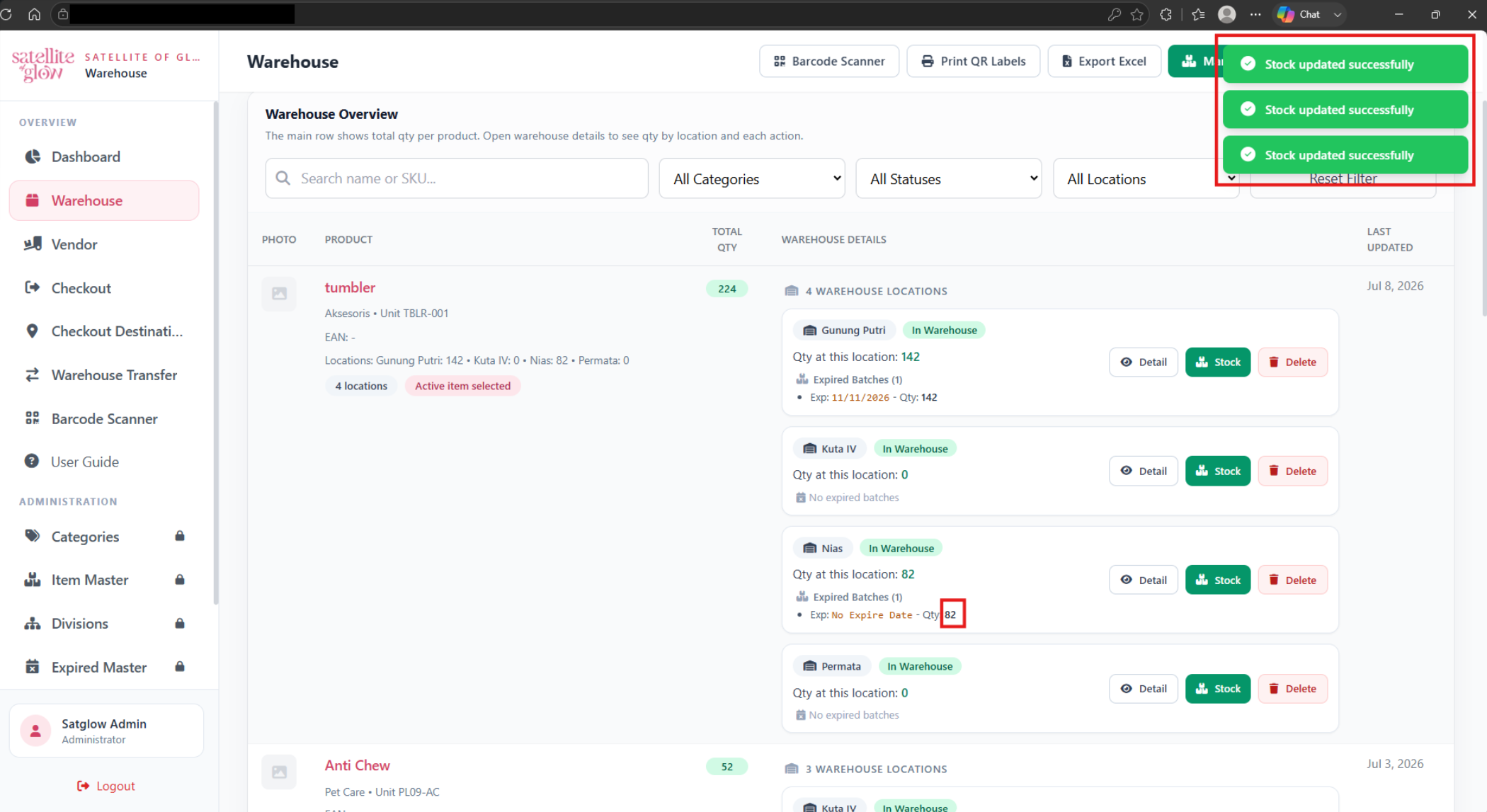
- The button remained active while the first request was pending. Three rapid clicks increased the selected batch from 52 to 82 units instead of 62 and displayed three success notifications.
- Severity
- Critical
- Priority
- Critical
- Status
- Fixed — retest passed
- Retest
- After the fix, a rapid three-click attempt processed one stock update only. The quantity increased by 10 once, a single success notification appeared, and the control became available after processing completed.
Testing evidence
BUG-02Restocked warehouse row does not return to Checkout
- Environment / build
- Production — Checkout / Warehouse Item List.
- Browser
- Microsoft Edge Version 155.0.4283.45 (Official build) (64-bit).
- Device
- Windows 11 25H2.
- Preconditions
- The same item can be held at multiple warehouse locations.
- The Nias placement can be fully checked out and restocked.
- Steps
- In Checkout, locate an item with 10 units at Nias.
- Check out all 10 units and confirm the placement reaches zero and disappears from checkout eligibility.
- Add 720 units to the same item at Nias.
- Confirm the new quantity appears in Warehouse.
- Return to Checkout, search for the item, and inspect its warehouse rows.
- Expected result
- The Nias Item + Warehouse row reappears with its current available quantity and can be checked out again. Other warehouse placements remain unaffected.
- Actual result
- Warehouse showed 720 units at Nias after restocking, but the corresponding row remained missing from Checkout and could not be selected.
- Severity
- Major
- Priority
- High
- Status
- Fixed — retest passed
- Retest
- After the fix, the Nias row returned to Checkout with the latest available quantity after restocking; other warehouse rows remained available.
Testing evidence
BUG-03Items created in Staging also appear in Production
- Environment / build
- Staging and Production — Item Master (Production impact).
- Browser
- Microsoft Edge Version 155.0.4283.45 (Official build) (64-bit).
- Device
- Windows 11 25H2.
- Preconditions
- Staging and Production are accessible.
- A unique test item can be created in Staging and safely searched in Production.
- Steps
- Open Item Master in Staging.
- Create and save an item with a clearly identifiable test name.
- Open Item Master in Production and search for the test item.
- Observe whether the Staging-created item appears in Production.
- Expected result
- Staging and Production use isolated data sources. Creating, updating, or deleting data in Staging must not change Production data.
- Actual result
- An item created through Item Master in Staging also appeared in Production, showing that the environments were not isolated for this data flow.
- Severity
- Critical
- Priority
- Critical
- Status
- Fixed — retest passed
- Related test cases
- TC-05
- Retest
- After the fix, an item created in Staging did not appear in Production.
Results & limitations
Verified outcomes
- All three selected Production defects were fixed and passed retest in Microsoft Edge.
- The selected regression checks confirmed that stock updates were processed once, restocked items returned to Checkout, and items created in Staging did not appear in Production.
- All five selected test cases passed.
Limitations & remaining risks
- Build identifiers and test execution dates are not included in this portfolio summary.
Lessons & next steps
- Test repeated actions while requests are pending when duplicate processing can affect business data.
- Validate full state transitions, including what happens after stock reaches zero and is later restored.
- Compare data across connected modules and environments to catch integrity issues that a single-page check can miss.