Project overview
IFC News is a financial news and market insights platform that brings together articles from 10 Indonesian publishers, stock analysis, and weekly economic insights. It also includes user accounts, saved articles, source preferences, multilingual content, Premium subscriptions, and payment flows.
As a QA Engineer on the External Project team, I worked with the project manager and developers to review requirements, test features in Staging and Production, explain reproducible bugs, and retest fixes. My work included exploratory and structured testing, comparisons with original news articles, localization and responsive checks, and Production payment verification across subscription workflows.
The five test cases and three bug reports below are selected examples from my broader QA work. They do not represent all features tested or issues reported on IFC News. Other work included scraping compatibility and completeness, localization, profile and source preferences, stock data consistency, and payment integration.
Environment notes
The primary test device used Windows 11 25H2. The Production metrics and sign-up reports were tested in Microsoft Edge Version 155.0.4283.45 (Official build) (64-bit). The Stock Suggestions report includes evidence from Google Chrome and comparison checks in Microsoft Edge and Mozilla Firefox.
Role & contribution: QA Engineer, External Project team
- GitHub Kanban
- Postman
My contribution
- Reviewed requirements and tickets with the project manager, clarified expected behavior, and suggested improvements when acceptance criteria were unclear.
- Tested features across news aggregation, stock analysis, account and profile settings, localization, subscriptions, and payments in Staging and Production.
- Compared scraped articles with the original publisher pages to assess content completeness and differences between sources.
- Created and maintained reproducible bug reports in GitHub Kanban, explained findings to developers, and retested fixes against the requirements.
- Performed Production payment verification for subscription activation and extension after a payment webhook issue was corrected.
Testing scope
- Core product areas: Home, Trending, Stock Analysis, Weekly Analysis, News Stream, article detail pages, Premium, Profile, Saved Articles, Muted Sources, Email Notifications, and Payment History.
- News scraping and content quality across 10 Indonesian publishers, including article completeness, paragraph structure, images, metadata, duplicate articles, translation, and access to original articles.
- Financial data presentation and consistency, source and category filters, account and profile behavior, support for three languages, themes, and responsive layouts.
- Subscription workflows and Pakasir payment integration in Staging and Production, including payment status, activation, extension, persistence after reload, and prevention of duplicate processing.
Testing approach
- Started with exploratory testing to learn feature behavior and identify high-risk paths, then applied black-box functional testing against requirements and expected user outcomes.
- Covered end-to-end workflows, integration behavior, and API checks with Postman; used smoke and sanity checks for core paths and regression testing after fixes and UI changes.
- Validated scraper output by comparing IFC News articles with their original publisher pages; checked content completeness rather than treating a successful request as proof of a successful scrape.
- Performed localization, responsive, compatibility, and usability checks across supported pages and languages.
- Verified payment and subscription behavior in Production as well as Staging, including the effect of a corrected webhook configuration.
- Used Microsoft Edge for most checks; the stock-logo compatibility example also covered Google Chrome and Mozilla Firefox.
- Included performance testing in the broader QA work and tracked findings and follow-up in GitHub Kanban.
Challenges & QA decisions
Validate scraped content against the source
I compared articles shown in IFC News with their original publisher pages, checking completeness and structure. A successful scraper request alone was not enough to confirm that the resulting article was usable.
Separate product defects from environment behavior
When the stock ticker appeared static on one QA laptop, investigation showed that Windows Animation Effects was turned off, so the browser applied reduced-motion behavior. I treated this as a local environment condition rather than reporting it as a product defect.
Retest issues affected by external sources
An anti-bot issue on one news source affected article images. The original condition could not be reproduced during an earlier retest. The issue was later resolved, and the source could be scraped again. This showed why changing conditions on external sites need to be considered during investigation and retesting.
Test production integration boundaries
During Production payment verification, successful gateway payments initially did not update the subscription. After the webhook configuration was corrected, I verified subscription activation and extension behavior, including persistence and duplicate-processing checks.
Describe the required outcome clearly
Rapid auto-save requests in Muted Sources could trigger rate limits. I described the expected behavior as reliable saving and request handling, without requiring a specific implementation. I also reported profile translation and muted-source saving issues separately because they had different behavior and acceptance criteria.
Test cases
| ID | Scenario | Type | Result |
|---|---|---|---|
| TC-01 | Show article-specific numeric metrics in the production news stream | Functional / regression | Passed |
| TC-02 | Omit numeric cards when an article has no relevant numeric data | Negative / regression | Passed |
| TC-03 | Block an invalid password before proceeding from sign-up Step 1 | Negative / functional | Passed |
| TC-04 | Block progression from Step 1 when Confirm Password does not match | Negative / functional | Passed |
| TC-05 | Display company logos on stock cards across the tested browsers | Compatibility / regression | Passed |
TC-01Show article-specific numeric metrics in the production news stream
- Type
- Functional / regression
- Preconditions
- The production News Stream contains multiple unrelated finance articles.
- At least two reviewed articles contain different relevant numeric information.
- Test data
- Unrelated financial articles containing different numeric information.
- Steps
- Open the production News Stream.
- Review numeric cards for several unrelated articles.
- Compare each card's metric labels and values with the information relevant to its associated article.
- Check whether unrelated articles are forced to show an identical metric structure or repeated staging sample values.
- Expected result
- Each article shows only relevant numeric metrics and values; labels may differ by article and unrelated articles are not populated with the same staging mock data.
- Actual result
- On retest, metric labels and values reflected the information associated with each reviewed article; unrelated articles no longer shared the staging mock metrics.
- Status
- Passed
- Related bug reports
- BUG-01
TC-02Omit numeric cards when an article has no relevant numeric data
- Type
- Negative / regression
- Preconditions
- A production news article is available without valid or relevant numeric information for a metric card.
- Test data
- An article without supported numeric details for the card.
- Steps
- Open the production News Stream.
- Locate an article without relevant numeric information for a metric card.
- Inspect the card area associated with that article.
- Expected result
- The article does not display unrelated mock metrics or values when relevant numeric data is unavailable.
- Actual result
- On retest, unrelated mock metrics were not shown for an article without relevant numeric information.
- Status
- Passed
- Related bug reports
- BUG-01
TC-03Block an invalid password before proceeding from sign-up Step 1
- Type
- Negative / functional
- Preconditions
- The staging sign-up form is open at Step 1.
- Full Name, Date of Birth, and Email Address contain valid synthetic test values.
- Test data
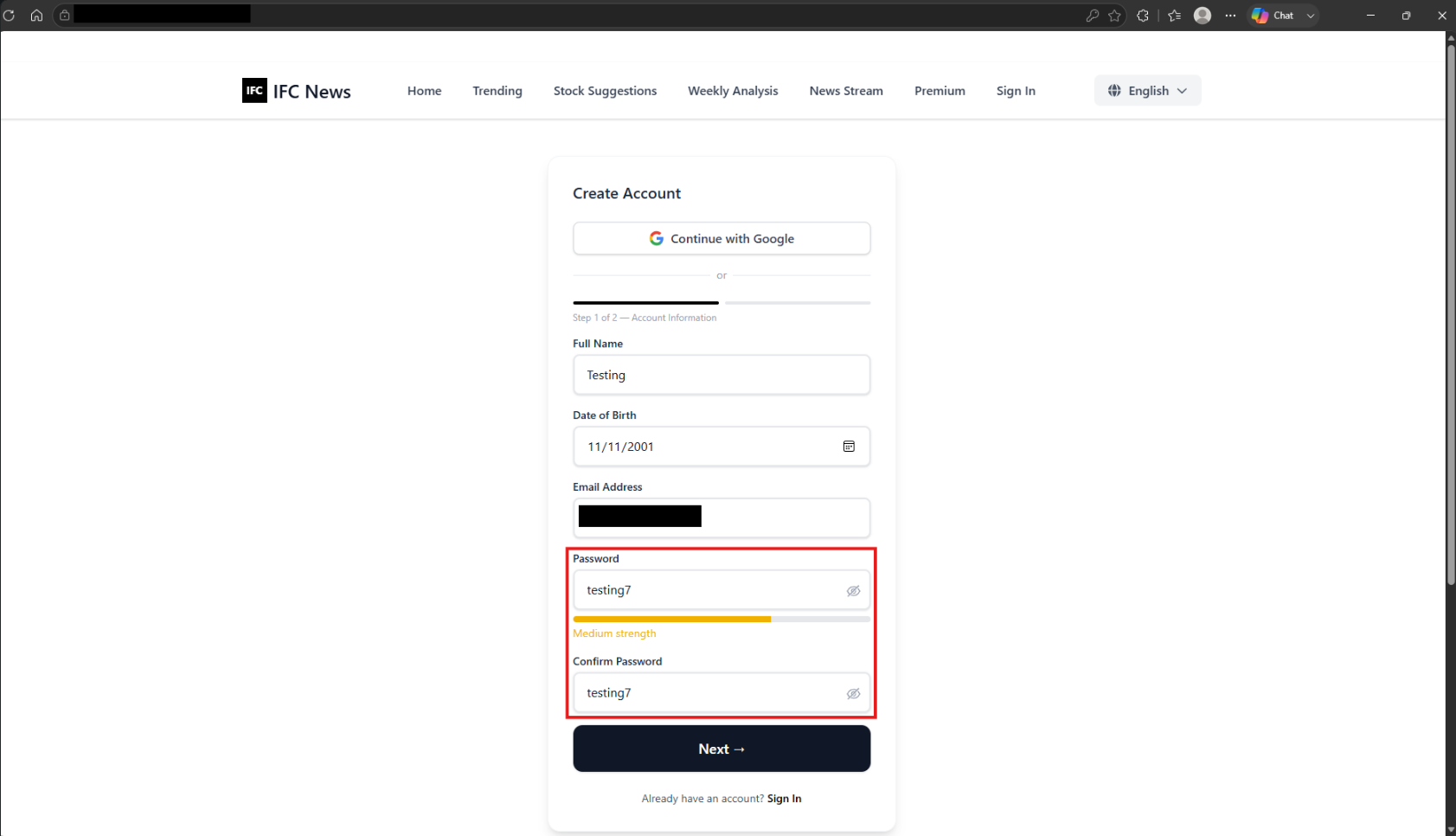
- Both Password and Confirm Password contain testing7, which lacks an uppercase letter and a special character.
- Steps
- Complete the other required fields on Step 1 with valid data.
- Enter a password that does not satisfy the configured rules and repeat it in Confirm Password.
- Select Next.
- Review the current step and the validation feedback beside Password.
- Expected result
- The form stays on Step 1, explains the unmet password requirement near Password, and preserves the entered values so they can be corrected.
- Actual result
- On retest, the invalid password was rejected at Step 1 with clear field-level feedback; the user could not proceed until it met the rules.
- Status
- Passed
- Related bug reports
- BUG-02
TC-04Block progression from Step 1 when Confirm Password does not match
- Type
- Negative / functional
- Preconditions
- The staging sign-up form is open at Step 1.
- Required profile fields contain valid synthetic test values.
- Password satisfies the configured password rules.
- Test data
- A valid test password and a different Confirm Password value.
- Steps
- Complete the other required fields on Step 1 with valid data.
- Enter a password that satisfies the rules and a different value in Confirm Password.
- Select Next.
- Review the current step and the validation feedback beside Confirm Password.
- Expected result
- The form stays on Step 1 and shows a clear mismatch message beside Confirm Password until both values match.
- Actual result
- On retest, the mismatch was identified at Step 1 beside Confirm Password, and navigation was blocked until the values matched.
- Status
- Passed
- Related bug reports
- BUG-02
TC-05Display company logos on stock cards across the tested browsers
- Type
- Compatibility / regression
- Preconditions
- The staging Stock Suggestions page contains stock cards with available company-logo assets.
- Test data
- Stock cards with logo data, checked in Microsoft Edge, Google Chrome, and Mozilla Firefox.
- Steps
- Open Stock Suggestions in Microsoft Edge and inspect the company logos on the stock cards.
- Repeat the check in Google Chrome.
- Repeat the check in Mozilla Firefox.
- Compare logo rendering across the tested browsers.
- Expected result
- Company logos with available logo data render consistently in each tested browser, without empty placeholders.
- Actual result
- On retest, company logos displayed in Microsoft Edge, Google Chrome, and Mozilla Firefox.
- Status
- Passed
- Related bug reports
- BUG-03
Bug reports
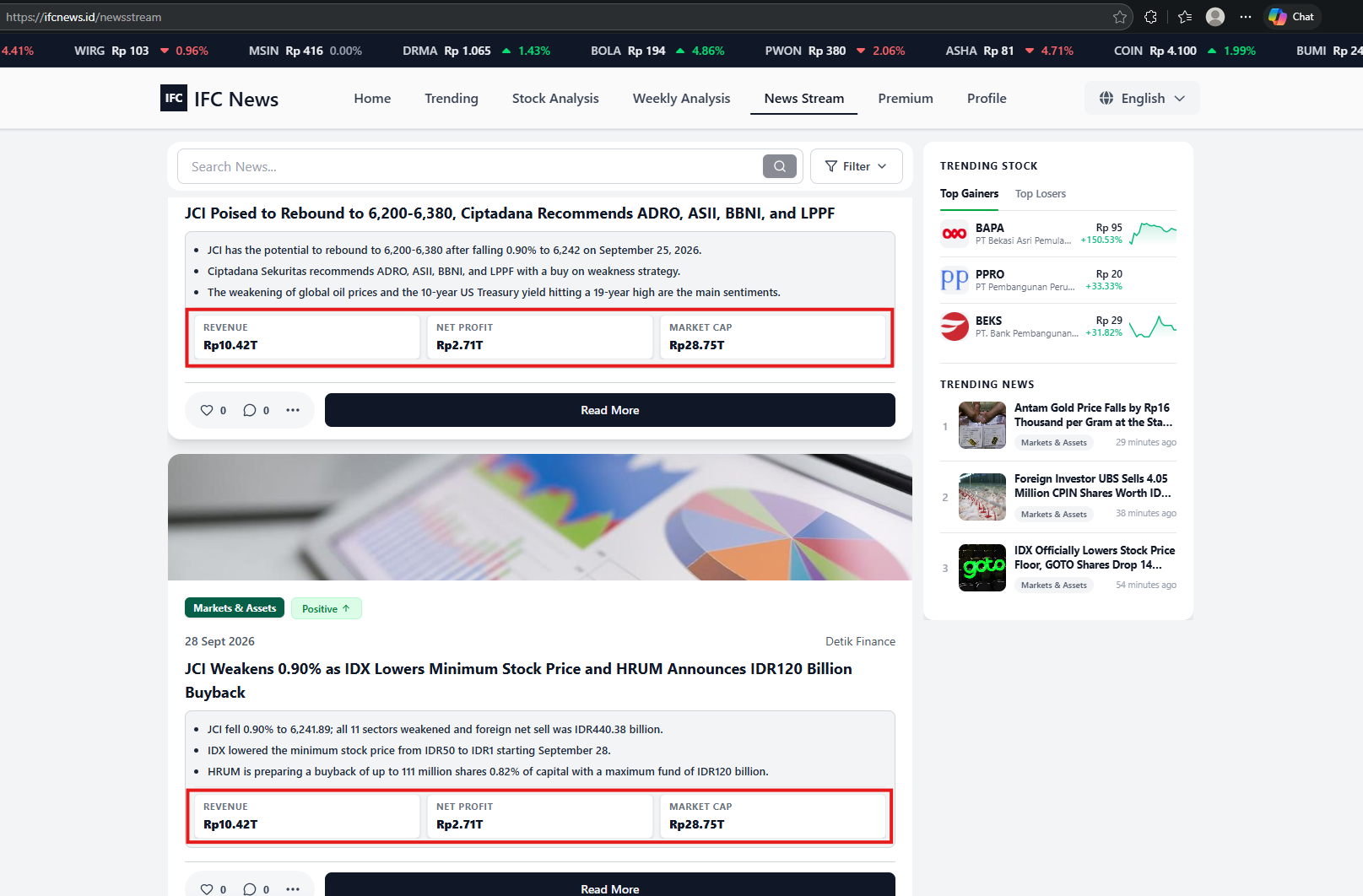
BUG-01Production news stream reuses staging mock metrics across unrelated articles
- Environment / build
- Production — News Stream.
- Browser
- Microsoft Edge Version 155.0.4283.45 (Official build) (64-bit).
- Device
- Windows 11 25H2.
- Preconditions
- Multiple unrelated finance articles are available in the production News Stream.
- Numeric cards are displayed for the reviewed articles.
- Steps
- Open the production News Stream.
- Review numeric cards for several unrelated articles.
- Compare the metric labels and values with the content of each associated article.
- Check whether different articles show the same metric structure and sample values.
- Expected result
- Numeric cards use relevant article-based data; metric types may vary by article. Staging mock values are not used in Production, and unrelated metrics are omitted when valid article data is unavailable.
- Actual result
- Different unrelated articles displayed the same staging mock metric labels and values instead of data relevant to each article.
- Severity
- Major
- Priority
- High
- Status
- Fixed — retest passed
- Retest
- After the fix, reviewed article cards reflected their associated numeric information, and articles without relevant data no longer displayed unrelated mock metrics.
Testing evidence
BUG-02Sign-up accepts an invalid password when moving from Step 1 to Step 2
- Environment / build
- Staging — Sign Up.
- Browser
- Microsoft Edge Version 155.0.4283.45 (Official build) (64-bit).
- Device
- Windows 11 25H2.
- Preconditions
- The sign-up form is open at Step 1.
- Required profile fields contain valid values and Password does not satisfy the configured rules.
- Steps
- Enter valid Full Name, Date of Birth, and Email Address values.
- Enter a password that violates the configured rules and repeat it in Confirm Password.
- Select Next.
- Complete Step 2 and select Create Account.
- Observe when and where the password validation error appears.
- Expected result
- Password rules and confirmation are validated when Next is selected. Invalid values keep the user on Step 1 and show clear feedback beside the relevant field; final account creation still performs server-side validation.
- Actual result
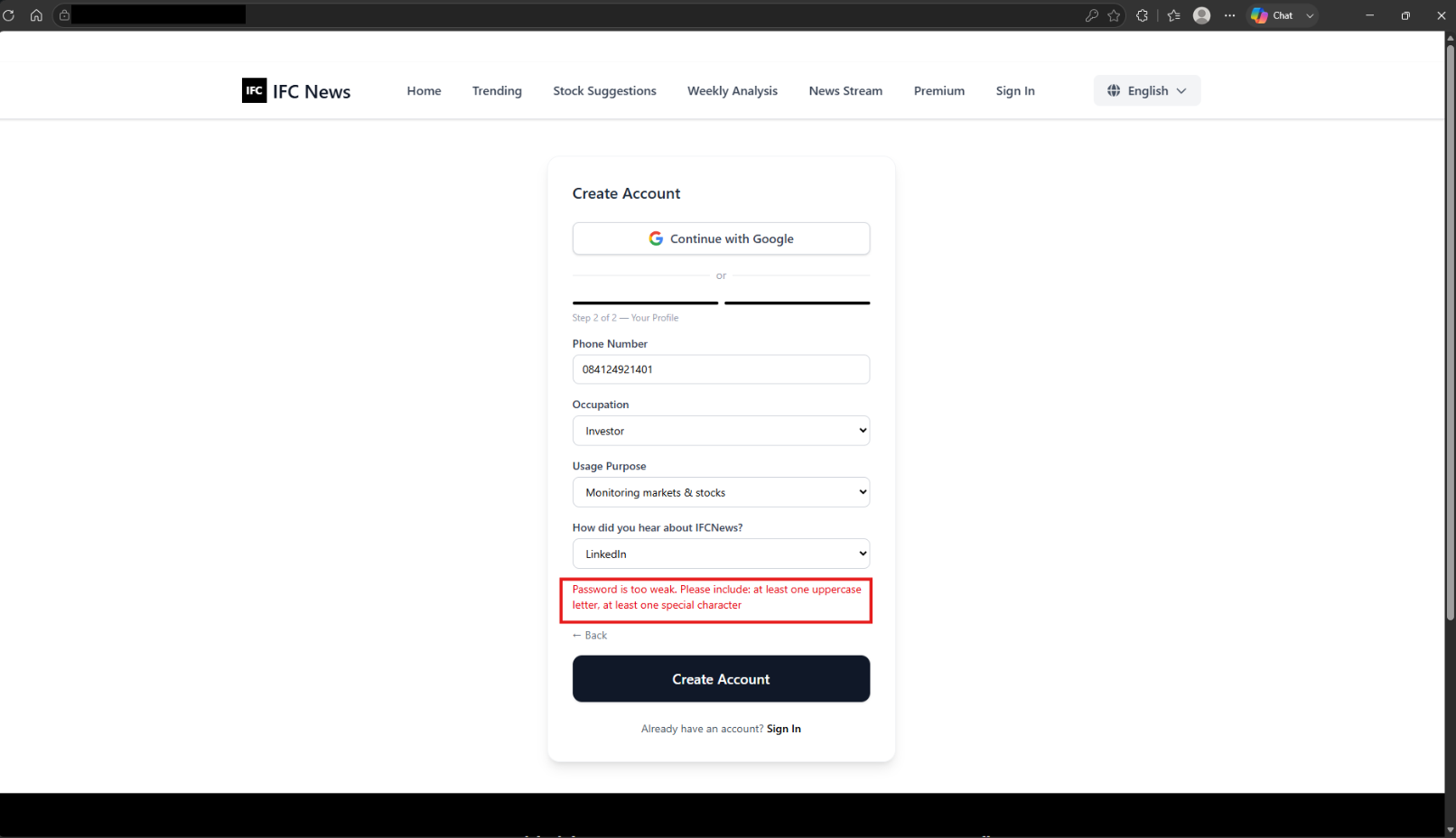
- The form allowed the invalid password through to Step 2. The password error appeared only after Create Account was selected, on a later step than the invalid field.
- Severity
- Major
- Priority
- High
- Status
- Fixed — retest passed
- Retest
- After the fix, invalid passwords and mismatched confirmation were rejected on Step 1 with field-level feedback. The user could proceed only after correcting both fields.
Testing evidence
BUG-03Company logos on stock cards fail to load in most tested browsers and devices
- Environment / build
- Staging — Stock Suggestions.
- Browser
- Google Chrome (evidence screenshot); comparison checks in Microsoft Edge Version 155.0.4283.45 (Official build) (64-bit) and Mozilla Firefox.
- Device
- Windows 11 25H2.
- Preconditions
- Stock cards with company-logo data are available.
- The page can be checked in the named browser environments.
- Steps
- Open Stock Suggestions in Microsoft Edge and inspect the stock-card logos.
- Open the same page in Google Chrome and inspect the same logos.
- Repeat the check in Mozilla Firefox and on the other devices included in the original test.
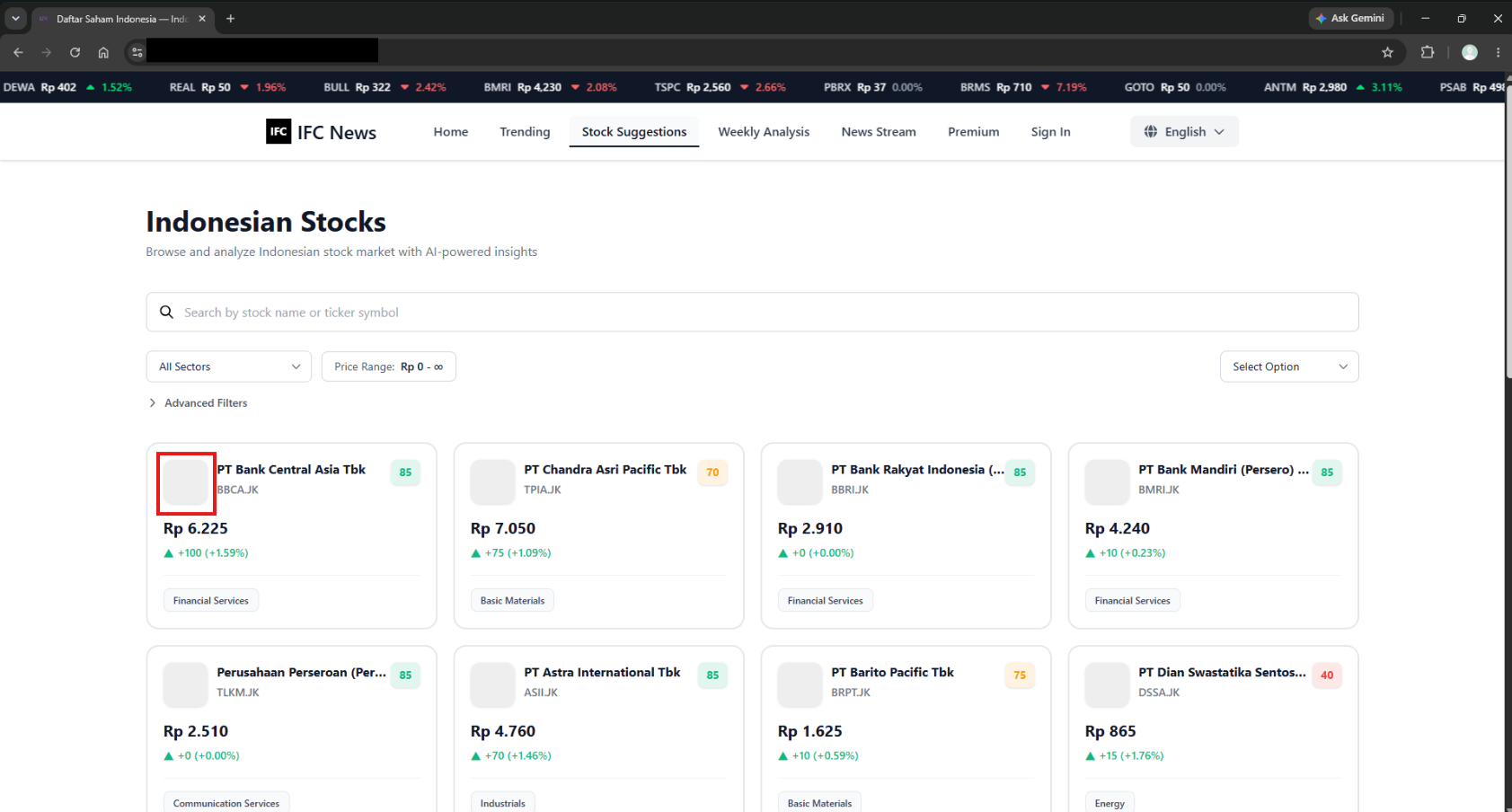
- Compare whether the logo assets render or leave empty placeholders.
- Expected result
- Company logos with available data render consistently across the tested browsers and devices; empty placeholders do not appear when a logo is available.
- Actual result
- Logos rendered only in Microsoft Edge on the tester's device; they were missing in Google Chrome, Mozilla Firefox, and the other devices in the original test.
- Severity
- Major
- Priority
- Medium
- Status
- Fixed — retest passed
- Related test cases
- TC-05
- Retest
- After the fix, logos rendered in the tested Microsoft Edge, Google Chrome, and Mozilla Firefox environments.
Testing evidence
Results & limitations
Verified outcomes
- Validated selected articles from the platform's 10 Indonesian publishers against their original source pages.
- Production payment verification covered subscription activation and extension after the webhook configuration was corrected; the checked persistence and duplicate-processing behavior matched expectations.
- All three selected defects were fixed and passed retest against the stated requirements; all five selected test cases passed.
Limitations & remaining risks
- Exact Google Chrome and Mozilla Firefox versions, build identifiers, and test execution dates are not included in this portfolio summary.
- The accuracy of Stock Analysis and Weekly Analysis figures was not fully verified. Data freshness also remains a consideration because updates were not always real-time.
- Scraping for one news source was restored and verified. Future changes to publisher page structures or anti-bot controls may affect scraping reliability.
Lessons & next steps
- Compare scraped content with its original source, and assess completeness and structure as well as whether the source request succeeded.
- Separate application defects from local settings and external-service behavior before deciding whether an issue is reproducible.
- Verify production integration boundaries and retest user-visible outcomes after configuration changes.